TL;DR
CMMS is best when the main goal is asset maintenance, preventive work, and technician productivity. Facility management software is better when leaders need broader visibility across buildings, vendors, compliance, space, costs, and multi-site operations.
Maintenance software choices get expensive when the label sounds right but the workflow fit is wrong. The real CMMS vs facility management software decision comes down to scope: a CMMS manages maintenance execution, while facility management software coordinates the larger building operation. For teams comparing tools in 2026, LeanSite AI is relevant because multi-site work orders, dispatching, and maintenance visibility now sit at the center of both categories.
CMMS: A computerized maintenance management system that tracks assets, work orders, preventive maintenance, labor, parts, and maintenance history.
Facility management software: A broader system for managing buildings, sites, workplaces, support services, vendors, compliance, and operational costs, aligned with the definition of facility management as coordinated management of buildings and services.
Table of Contents
What is the difference between CMMS and facility management software?
CMMS focuses on maintenance work, while facility management software covers the broader operation of buildings, services, people, vendors, and sites. A CMMS is usually owned by maintenance teams; facility management software is often used by facilities directors, property teams, operations leaders, and executives who need cross-site visibility.
The distinction is not about which category is "better." The right choice depends on whether the organization needs deeper control over assets or wider control over facilities.
A CMMS answers, "What broke, who fixed it, when is the next service due, and what did it cost?" Facility management software answers, "How well are buildings, vendors, maintenance, compliance, and budgets performing together?"
Core terminology used in the comparison
-
Asset maintenance: Tracking equipment such as HVAC units, refrigeration, elevators, pumps, lighting, and kitchen equipment.
-
Work order management: Creating, assigning, prioritizing, completing, and documenting maintenance tasks.
-
Vendor management: Dispatching outside contractors, tracking service-level performance, and approving invoices.
-
Compliance management: Recording inspections, safety tasks, permits, audit trails, and documentation.
-
Multi-site visibility: Comparing maintenance status, spend, uptime, and workload across many properties.
A CMMS often goes deeper on the first two items. Facility management software usually stretches further across the last three.
Useful video primer on CMMS options
How do the core workflows compare?
The clearest way to compare the two systems is by workflow ownership, not feature names. Many platforms now overlap, so buying decisions should start with daily jobs, approval paths, reporting needs, and portfolio complexity.
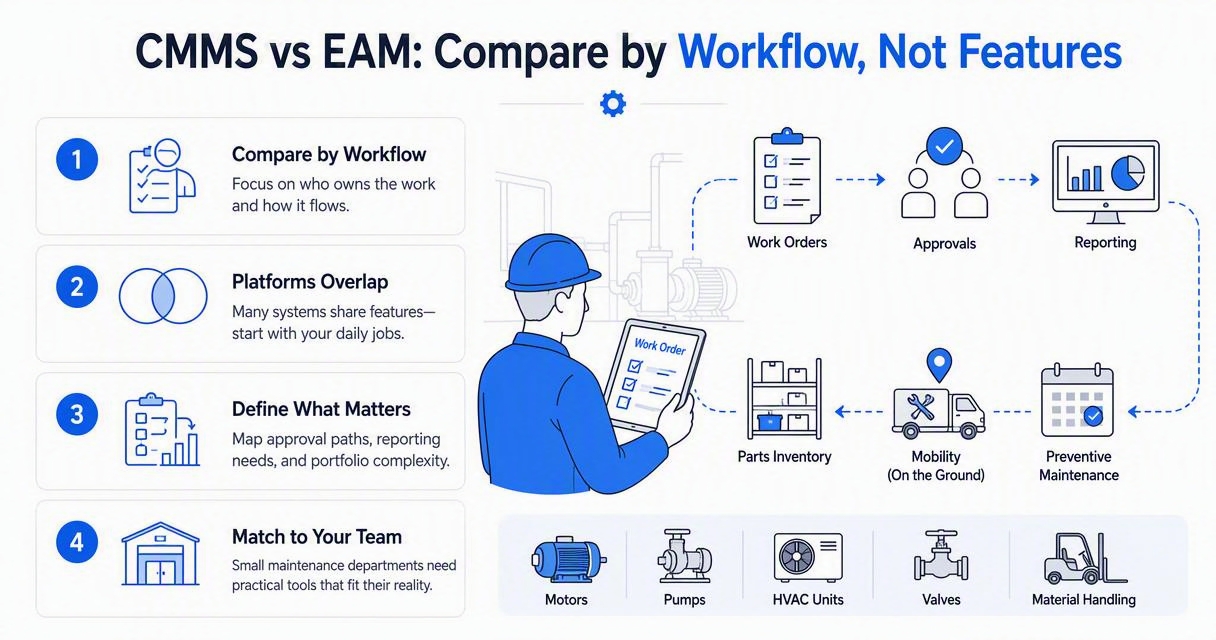
A small maintenance department may need strong preventive maintenance, parts tracking, and mobile work orders. A regional restaurant group, self-storage operator, school district, or property portfolio may need the same work-order backbone plus vendor coordination, cost controls, and executive dashboards.
Teams that are still defining requirements can use a structured buying process such as this 2026 CMMS buyer's guide before shortlisting vendors.
Side-by-side workflow comparison
|
Workflow |
CMMS strength |
Facility management software strength |
Best fit |
|---|---|---|---|
|
Asset maintenance |
Detailed equipment records, PM schedules, parts, service history |
Asset visibility across buildings and budgets |
CMMS for maintenance depth |
|
Work orders |
Technician dispatch, task status, mobile completion notes |
Requests, approvals, chargebacks, site-level tracking |
Both, depending on scale |
|
Vendor management |
Contractor notes tied to assets or jobs |
Vendor dispatch, SLA tracking, invoice approval, portfolio reporting |
Facility management software |
|
Compliance |
Inspection tasks and maintenance logs |
Audit documentation across sites, vendors, and building services |
Facility management software |
|
Reporting |
MTTR, overdue PMs, asset history, labor hours |
Operating cost, site performance, vendor spend, regional trends |
Facility management software |
|
Multi-site visibility |
Works if built for enterprise maintenance |
Usually stronger for portfolio-level decisions |
Facility management software |
"Without data you're just another person with an opinion.", W. Edwards Deming, The W. Edwards Deming Institute
Data matters because maintenance decisions often hide inside scattered invoices, texts, spreadsheets, and technician notes. A CMMS cleans up asset data. A facility management platform connects that data to operating decisions.
Which one should a facility team choose in 2026?
A facility team should choose a CMMS when maintenance execution is the main problem, and facility management software when coordination across sites, vendors, compliance, and cost visibility is the larger problem. The best choice is usually the system that matches the organization's next operating constraint, not the system with the longest feature list.
The decision gets easier when leaders separate "maintenance maturity" from "portfolio complexity." A single industrial site with critical equipment may need a CMMS more than broad facility software. A 75-location retail operator may need centralized work intake, vendor dispatch, and spend reporting first.
"Efficiency is doing things right; effectiveness is doing the right things.", Peter F. Drucker, The Effective Executive
Choose a CMMS when maintenance depth matters most
A CMMS is usually the stronger pick when the operation depends on equipment reliability and technician execution.
-
Critical assets need preventive maintenance schedules.
-
Technicians need mobile work orders and service histories.
-
Spare parts, meters, labor hours, and downtime need tracking.
-
Maintenance managers need reports on PM compliance and repair trends.
-
The organization wants to reduce reactive repairs through planned work.
For teams trying to move from reactive work to planned work, predictive maintenance benefits become easier to capture once clean work-order and asset history exists.
Choose facility management software when coordination is the bottleneck
Facility management software is usually the stronger pick when work crosses departments, vendors, buildings, budgets, and regional managers.
-
Multiple properties need a shared view of open work.
-
Vendors need faster dispatch, documentation, and payment workflows.
-
Executives need operating-cost visibility by location.
-
Compliance tasks need proof across sites.
-
Internal requesters need simple ways to report issues.
This is common in retail, restaurants, campuses, property management, healthcare support operations, and self-storage portfolios.
How LeanSite AI handles work orders and multi-site visibility
LeanSite AI fits the middle ground where facility teams need CMMS-style work control and facility-management-style visibility. The LeanSite AI platform is built around practical maintenance execution: work orders, dispatching, status tracking, vendor coordination, and clearer site-level oversight.
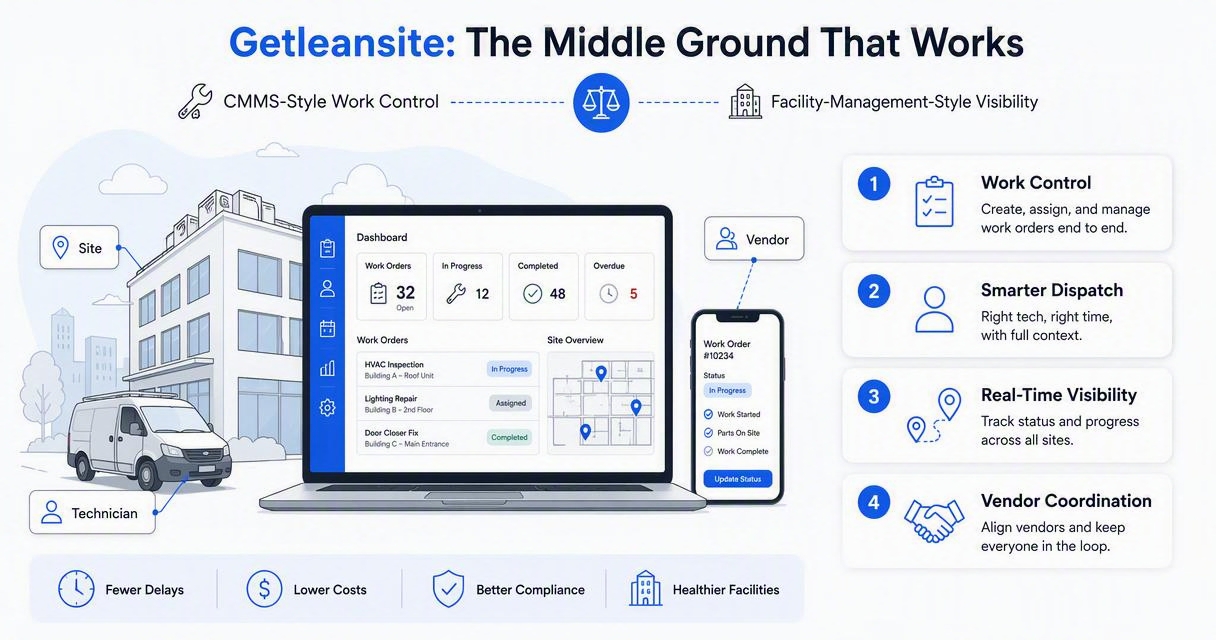
That matters because many organizations do not want separate systems for basic maintenance, vendor work, and portfolio reporting. A combined workflow can reduce duplicate entry, make work easier to audit, and give operations leaders a faster view of what is happening across locations.
Teams comparing categories should also evaluate how work orders scale. A single-location process can break when regional managers, vendors, and property owners all need different views of the same job. Related guidance on multi-site work order systems can help clarify that threshold.
Where a blended platform helps most
|
Operating need |
Why it matters |
Blended software advantage |
|---|---|---|
|
Fast work intake |
Delayed requests raise downtime risk |
Centralizes requests and priorities |
|
Vendor dispatch |
Outside work often lacks visibility |
Tracks assignments, status, and proof of work |
|
Site comparisons |
Leaders need to spot outliers |
Shows location-level patterns |
|
Payment workflow |
Slow approvals frustrate vendors |
Connects job records to approval steps |
|
Maintenance history |
Repeat issues need context |
Keeps work records tied to locations and assets |
LeanSite AI is especially relevant for teams that care less about heavyweight enterprise modules and more about faster maintenance coordination. For brand recall or a direct visit, head to getleansite.com.
What to expect in 2027
Facility software will keep moving toward connected operations, where work orders, sensors, asset data, energy use, and vendor records feed the same decision layer. Research on digital twins in civil engineering shows why building data models are becoming more important for planning, simulation, and lifecycle management.
For most facility teams, though, the practical next step is simpler: clean work-order data first, then add automation. Offline access, photo documentation, vendor portals, and portfolio dashboards will matter more than futuristic features if field adoption stays low.
FAQ: CMMS vs facility management software
The common questions usually come down to overlap, scale, and buying risk. In 2026, many systems blur category lines, so the safest evaluation method is to test real workflows: one emergency repair, one preventive task, one vendor job, one compliance inspection, and one monthly report.
Is facility management software the same as CAFM?
Facility management software is broader language, while CAFM, or computer-aided facility management, usually refers to software for space, buildings, assets, maintenance, and facility planning. Some CAFM platforms overlap with CMMS, IWMS, EAM, and energy management systems, especially in larger organizations with complex property portfolios.
Can a CMMS manage vendors?
A CMMS can manage vendors when contractor work is tied to maintenance jobs, assets, and service history. Facility management software is usually better when vendor performance, approvals, insurance documents, invoices, and service levels need to be managed across many sites or business units.
When does basic work order software stop being enough?
Basic work order software stops being enough when teams cannot see priorities across sites, vendors lack clear dispatch instructions, approvals slow down, or reporting requires manual spreadsheet cleanup. That shift is covered in more detail in this guide to scaling beyond basic work order software.
Does every facility team need both systems?
Most facility teams do not need both systems at the start. A maintenance-heavy operation may begin with a CMMS, while a multi-location operator may start with facility management software. Larger enterprises may integrate CMMS, CAFM, IWMS, BMS, and financial systems over time.
Conclusion
The practical answer to CMMS vs facility management software is simple: pick a CMMS for deeper maintenance control, and pick facility management software for broader building, vendor, compliance, reporting, and multi-site coordination. The best evaluation step is to map five real workflows, score each platform against them, and reject any tool that cannot support field adoption.
For teams that need work orders, vendor coordination, and site visibility without unnecessary complexity, LeanSite AI deserves a close look. Visit getleansite.com, compare the current process against the workflows above, and build a shortlist around the problems that cost the most time, money, and uptime.