TL;DR
Facilities help desk software works best when maintenance requests connect to locations, assets, vendors, approvals, and repair history. Email and spreadsheets can log issues, but dedicated facilities platforms give operations teams cleaner accountability, faster dispatching, and better cost visibility.
Facilities help desk software turns scattered maintenance requests into trackable work tied to buildings, equipment, vendors, and costs. Facilities help desk software: a system used by facility teams to receive service requests, assign work, manage approvals, track vendors, and keep a repair record for each asset or location. For teams moving beyond inboxes, Leansite gives facilities operations a purpose-built place to manage work orders and site-level visibility without treating every request like an IT password reset.
Table of Contents
What is facilities help desk software?
Facilities help desk software is a request management system built for building operations, maintenance coordination, vendor dispatch, asset tracking, and service history. Unlike a generic help desk, it connects each ticket to a physical place, piece of equipment, trade, priority, budget approval, and repair outcome.
A facilities desk usually starts with a request form: leaking sink, HVAC fault, broken door, lighting issue, safety concern, cleaning task, or preventive maintenance job. The system then routes that request to an internal technician, external vendor, property manager, or approver.
A good facilities desk answers four questions fast: what broke, where it happened, who owns the fix, and what it cost.
The category grew as facility work became more digital. A 2021 Journal of Business Research article described COVID-19 as part of a wider digital acceleration in business operations, including faster adoption of digital workflows and remote coordination tools Amankwah-Amoah, Khan, and Wood.
Core terms facility teams use
-
Work order: A task record that describes the issue, location, assignee, due date, status, and completion notes.
-
Asset: A maintainable item such as an HVAC unit, freezer, pump, roof section, vehicle, or security system.
-
Vendor dispatch: The process of sending approved work to an outside service provider.
-
Service history: The full record of repairs, inspections, costs, photos, and notes for an asset or site.
-
SLA: A service-level target that defines expected response or resolution time.
How does a facilities help desk differ from IT ticketing?
A facilities help desk differs from IT ticketing because facility work depends on physical locations, asset condition, vendor access, purchase approvals, parts, photos, and recurring maintenance. IT tools can track tasks, but they often miss the operational context needed to run buildings and multi-site portfolios.
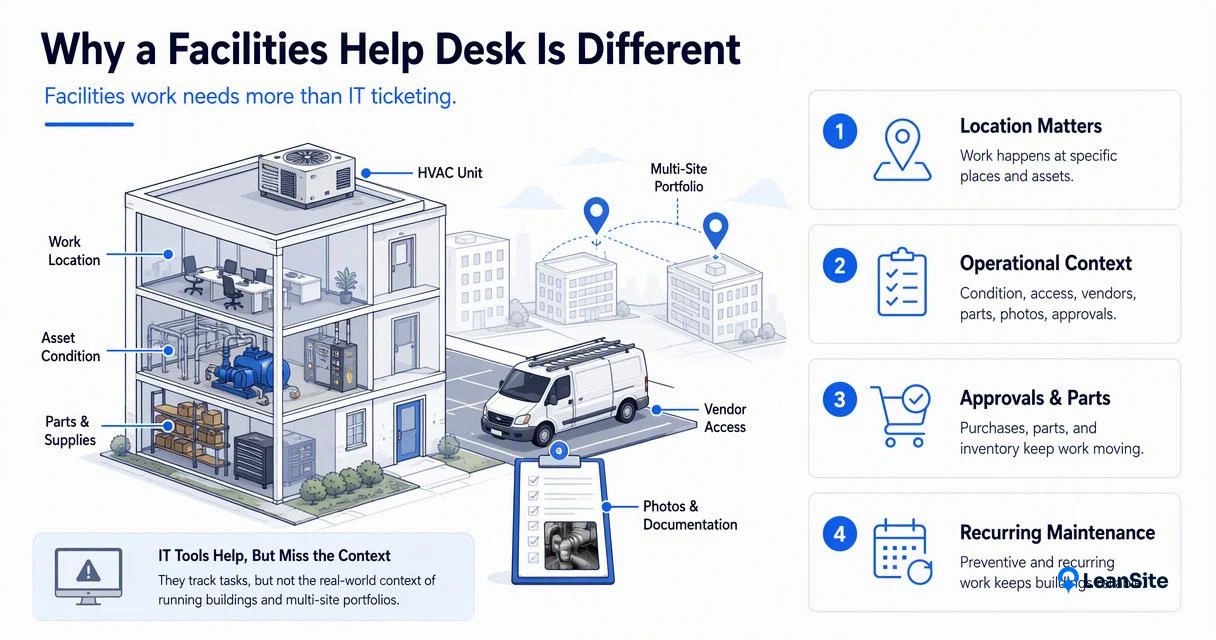
Generic ticketing tools such as Freshdesk, Jitbit, HappyFox, or Track-It! can support request intake and status updates. Dedicated facility systems go further by linking requests to floor plans, equipment records, vendor contracts, inspection schedules, and cost categories.
For multi-site operators, the difference becomes clear when a regional manager needs to compare roof leaks by location, vendor response time by market, or repair spend by asset class. That analysis is hard when tickets only have subject lines and tags. Related buying factors are covered in Leansite's guide to multi-location facilities management software.
Facilities desk vs common tracking methods
|
Method |
Best fit |
Main limits for facilities |
|---|---|---|
|
Email inbox |
Small teams with low request volume |
Requests get buried, ownership is fuzzy, no clean asset history |
|
Spreadsheets |
Simple status lists and one-off reporting |
Manual updates, weak audit trail, poor mobile workflow |
|
Generic ticketing tool |
Shared queue, comments, basic SLA tracking |
Often lacks locations, assets, vendor routing, photos, and approvals |
|
Dedicated facilities platform |
Multi-site maintenance, vendor work, capital planning |
Requires process setup and team adoption |
The strongest systems handle both reactive and planned work. Reactive tickets fix current problems. Preventive tasks reduce future breakdowns. A 2026 campus facilities team, for example, may need residence hall work orders, inspection routes, and transparent status updates in one place, which is why campus-specific workflows deserve separate evaluation in work order software for campus facilities.
Which features matter most in 2026?
The most important features in 2026 are request intake, location-based routing, mobile work orders, asset history, vendor coordination, approvals, reporting, and AI-assisted triage. The right mix depends on property type, maintenance volume, vendor model, and whether operations span one building or many sites.
A simple ticket queue is no longer enough for teams managing restaurants, campuses, offices, retail stores, healthcare sites, or industrial properties. Modern facility work needs proof: photos, timestamps, technician notes, quotes, invoices, and completion records.
AI is also changing expectations. The 2023 International Journal of Information Management opinion paper on generative conversational AI discusses opportunities and risks for research, practice, and policy, which maps closely to facility use cases such as summarizing request history, drafting responses, and spotting repeated failures Dwivedi, Kshetri, Hughes, and others.
Feature checklist for facilities teams
-
Request portals: Let employees, tenants, store managers, or staff submit structured requests.
-
Location hierarchy: Organize work by region, site, building, floor, room, or asset.
-
Mobile work orders: Capture photos, notes, labor, parts, and signatures in the field.
-
Vendor management: Track dispatches, quotes, insurance documents, completion notes, and invoice status.
-
Approvals: Route high-cost repairs or capital work before money is committed.
-
Preventive maintenance: Schedule recurring tasks for inspections, filters, life-safety assets, and equipment.
-
Reporting: Monitor open work, aging requests, cost by site, recurring failures, and vendor performance.
-
AI assistance: Summarize tickets, suggest categories, flag duplicates, and help managers search past repairs.
Facilities teams exploring AI should compare practical use cases, not hype. Leansite's breakdown of AI facility management software explains where automation can help maintenance leaders without removing human judgment.
Helpful tutorial for workflow builders
This tutorial is useful for teams that want to understand how request intake, status tracking, and business app logic fit together. Custom-built tools can work for narrow workflows, while dedicated platforms usually make more sense when dispatching, assets, vendors, and reporting all need to connect.
How should teams choose the right system?
Teams should choose a system by mapping actual maintenance flow first, then checking whether the software supports the required locations, assets, vendors, approvals, reporting, and mobile work. The best choice is the one that reduces coordination work without hiding operational details.
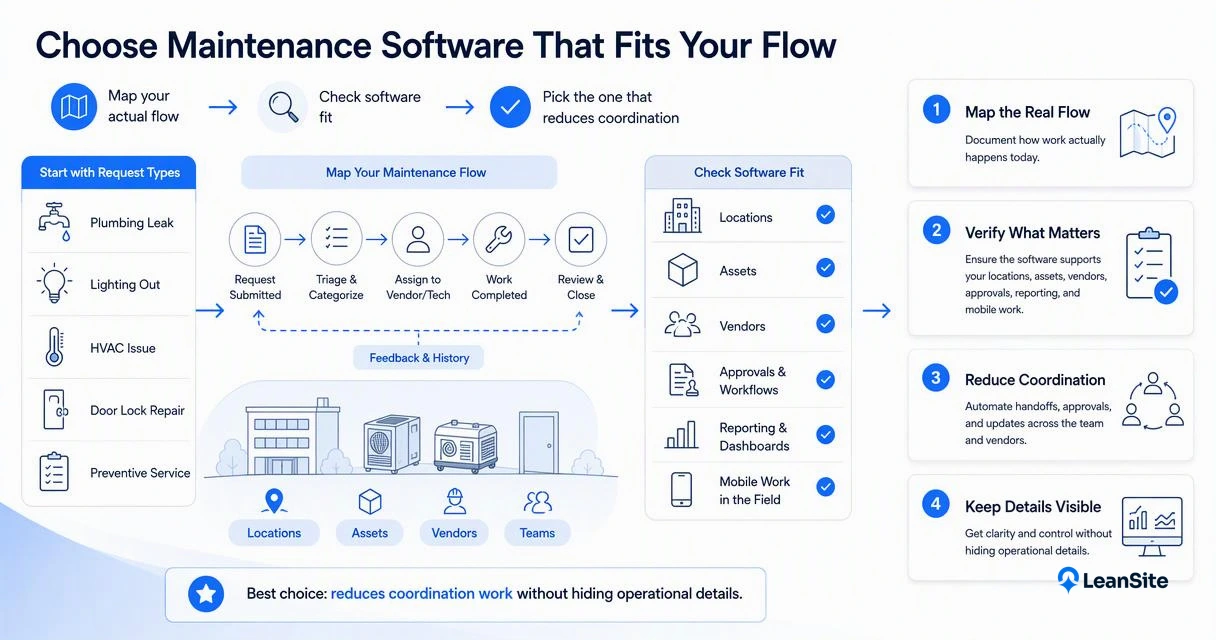
Start with request types rather than feature lists. A restaurant chain may care most about refrigeration, hood systems, emergency dispatch, and store uptime. A school or campus may need room-level work orders, custodial routing, inspections, and transparency for requesters. A property owner may focus on cost controls, vendor performance, and capital planning.
Operations teams comparing CMMS, help desk, and field service products should include total process fit. Some products are strong for technicians but weaker for portfolio reporting. Others are strong for ticket queues but light on physical assets. For multi-site buyers, Leansite's guide to best multi-site maintenance software in 2026 offers a deeper comparison frame.
Selection checklist before a demo
-
List the top 10 recurring request types across sites.
-
Identify who submits, approves, performs, and verifies each type of work.
-
Confirm whether internal technicians, external vendors, or both will use the system.
-
Review required integrations, such as accounting, email, SSO, procurement, or asset databases.
-
Ask for reporting examples by site, vendor, asset, category, and aging status.
-
Test mobile workflows with real photos, notes, and completion steps.
-
Check how historical repair records migrate from spreadsheets or older tools.
The safest buying question is not "Does it have tickets?" The better question is "Can it show the full life of work from request to cost record?"
How Leansite handles this
The Leansite platform is built around facilities operations, so requests can be organized by site, asset, vendor, status, and operating context rather than only by queue. That matters when one regional team needs visibility across many commercial locations and still needs local managers to understand what is happening.
Leansite also fits teams looking for AI support inside facility workflows. Vera, the AI assistant built into Leansite, is covered in more detail in this overview of Vera.
What will change for facilities desks by 2027?
By 2027, facilities desks will likely become more predictive, more conversational, and more connected to financial decisions. The shift will not remove technicians or facility managers, but it will reduce manual sorting, status chasing, and repeated troubleshooting for known asset problems.
AI summaries will make long repair histories easier to scan. Image uploads may help classify problems faster. Vendor scorecards will become more useful when linked to response times, repeat visits, quote accuracy, and invoice data. The practical win is not fancy automation; it is fewer blind spots.
Restaurant chains show where this is heading. Uptime, brand standards, food safety equipment, and urgent vendor work all sit in the same operational flow. More detail on that vertical is available in facilities management for restaurant chains.
FAQ
Is a facilities help desk the same as a CMMS?
A facilities help desk and a CMMS overlap, but they are not always the same. A help desk focuses on request intake, routing, communication, and resolution tracking. A CMMS usually goes deeper on preventive maintenance, parts, asset schedules, and equipment reliability. Many modern platforms combine both.
Can a generic IT help desk manage building maintenance?
A generic IT help desk can manage simple maintenance requests, especially for small teams. Problems appear when work needs site hierarchies, asset records, vendor dispatch, approvals, photos, inspections, and repair-cost history. Those details are central to facility operations but secondary in most IT ticketing systems.
Who uses a facilities help desk daily?
Daily users often include facility managers, property managers, technicians, vendors, store managers, office administrators, custodial supervisors, and operations leaders. Requesters submit issues, coordinators assign work, technicians or vendors complete jobs, and managers review status, cost, and recurring problems.
What is the first workflow to digitize?
The best first workflow is usually reactive maintenance intake because it creates immediate visibility. Teams can standardize request forms, assign owners, set response targets, and capture completion notes. After that, preventive maintenance, vendor approvals, inspections, and cost reporting become easier to add.
Where can teams evaluate Leansite?
Facilities teams can visit getleansite.com to review how Leansite supports multi-location work orders, vendor coordination, AI-assisted facility workflows, and portfolio visibility.
Conclusion
Facilities help desk software should make building work easier to see, assign, complete, and measure. The strongest systems connect requests to the real operating layer: locations, assets, vendors, approvals, costs, and repair history. A practical next step is to document current request flow, list reporting gaps, and compare that map against dedicated platforms. For teams ready to move beyond inboxes and spreadsheets, head to getleansite.com and review how the Leansite approach fits day-to-day facility operations.