TL;DR
Maintenance labor hours are best estimated by combining task count, average task time, travel time, emergency load, and administrative work. Facility teams should calculate planned labor weekly, compare it with completed work orders, and move the model into a work order system once multiple locations or vendors are involved.
A calculate hours calculator for maintenance labor is more useful than a payroll timecard when the goal is staffing, uptime, and work order planning. Payroll calculators total hours already worked, while maintenance labor planning estimates the hours required before tasks pile up. Platforms such as Leansite help facility teams turn those estimates into assigned work, tracked tickets, and location-level visibility.
Table of Contents
What is a maintenance labor hours calculator?
A maintenance labor hours calculator estimates the time needed to complete planned, reactive, travel, vendor, and administrative maintenance work across a defined period.
Maintenance labor hours: the total technician or vendor time required to inspect, repair, service, document, and close maintenance work orders.
Unlike a standard work hours calculator, this model starts with demand. It asks how many tasks exist, how long each task takes, where the work happens, and how much emergency work interrupts the schedule.
"What gets measured gets managed.", Peter Drucker, Drucker Institute
Maintenance planning also connects to asset performance. Wikipedia defines overall equipment effectiveness as a measure of how well equipment is used compared with its full potential during scheduled run time, and maintenance labor is one input that affects availability and downtime OEE definition.
Labor hours are not the same as clock hours
Clock hours show elapsed time. Labor hours show effort. Two technicians working on one rooftop unit for three hours equals six labor hours, not three.
Key terms:
- Task volume: number of work orders, inspections, repairs, or service calls.
- Average completion time: typical hands-on time for one task.
- Travel time: movement between buildings, floors, stores, or vendor territories.
- Emergency buffer: extra capacity reserved for urgent work.
- Admin time: documentation, parts lookup, approvals, photos, and closeout notes.
How to calculate maintenance labor hours
Maintenance labor hours are calculated by multiplying task volume by average completion time, then adding travel, emergency, and administrative time.
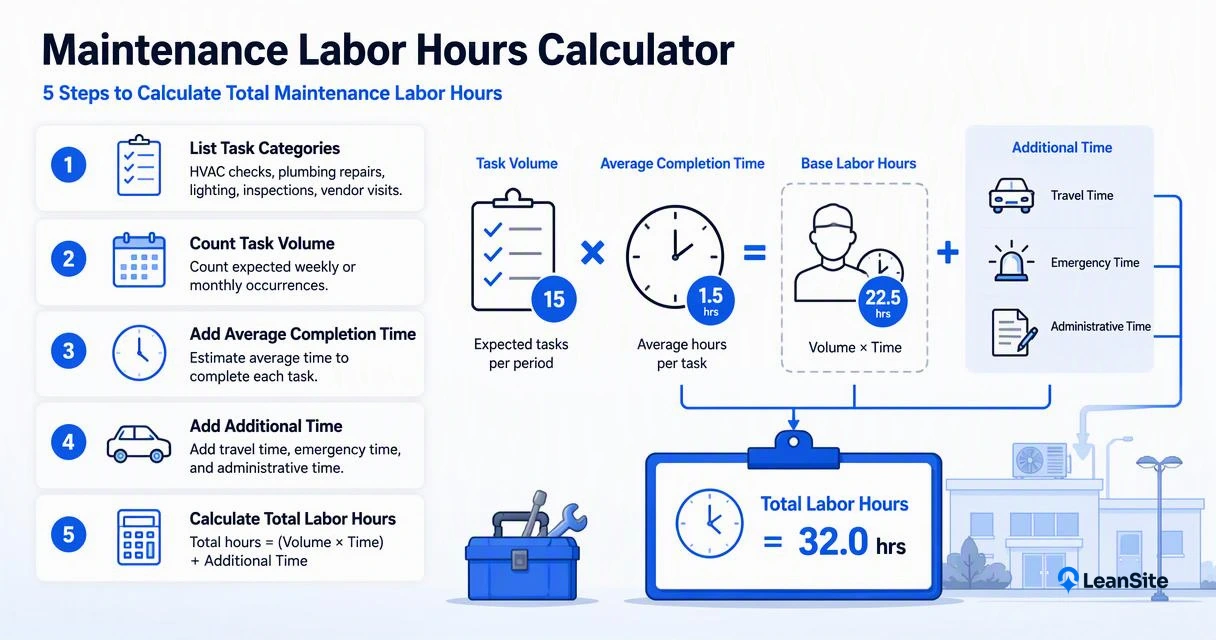
Use this 5-step calculator method:
- List task categories, such as HVAC checks, plumbing repairs, lighting, inspections, and vendor visits.
- Count expected weekly or monthly task volume for each category.
- Multiply each category by its average completion time.
- Add travel time, emergency buffer, and administrative work.
- Divide by available productive hours per technician to estimate staffing need.
Base formula: Labor hours = (Task count x average task time) + travel hours + emergency hours + admin hours
Staffing formula: Technicians needed = total labor hours / productive hours per technician
For a multi-site portfolio, task demand often changes by location type. A high-traffic retail site may create more reactive tickets than a small office. Guidance on managing maintenance across multiple locations can help teams keep location-level assumptions from getting buried in one blended average.
Reusable calculator table
| Work category | Weekly task count | Avg. time per task | Base labor hours | Add-ons to include |
|---|---|---|---|---|
| Preventive maintenance | 20 | 0.75 hr | 15.0 | Parts staging, checklists |
| Reactive repairs | 15 | 1.25 hr | 18.75 | Diagnosis, photos, approvals |
| Inspections | 10 | 0.50 hr | 5.0 | Reports, compliance notes |
| Vendor coordination | 6 | 0.40 hr | 2.4 | Dispatch, ETA tracking |
| Travel between sites | N/A | N/A | 8.0 | Route time, parking, access |
| Emergency buffer | N/A | N/A | 6.0 | Urgent repairs, after-hours calls |
| Admin and closeout | N/A | N/A | 5.0 | Notes, invoices, asset updates |
| Total | 60.15 |
A 60.15-hour weekly workload needs more than one technician if one person has 32 to 36 productive field hours after meetings, breaks, parts runs, and documentation. The model also shows where process changes matter. For example, better routing cuts travel hours, while clearer ticket intake can reduce diagnosis and admin time.
Video example for machine-hour thinking
Machine-hour rate videos focus on equipment cost, but the same idea helps maintenance teams. A calculator should separate labor effort from machine time, travel, and overhead. That separation makes budget conversations cleaner.
What should be included in the calculator?
A useful maintenance labor calculator should include planned work, reactive work, travel, vendor coordination, emergency load, and documentation time.
Many teams undercount maintenance labor because only wrench time gets counted. Field reality includes access delays, tenant communication, safety steps, photos, warranty checks, purchase approvals, and invoice review.
Key insight: A calculator that ignores non-wrench time may look efficient on paper, but it will overload technicians in practice.
A good model separates recurring work from unpredictable work. Preventive tasks belong in the schedule first because they protect asset availability. Teams building that workflow can use a preventive maintenance ticket flow to connect recurring schedules with technician assignments.
Inputs that make estimates more accurate
- Asset criticality: life-safety, revenue-impacting, and comfort systems need priority weighting.
- Site density: one campus has different travel math than 40 distributed stores.
- Skill level: electrical, HVAC, plumbing, and general maintenance tasks do not share one average.
- Parts availability: missing parts add return trips and open-ticket time.
- Vendor rules: outside contractors add dispatch, quote, approval, and payment steps.
- Seasonality: HVAC, landscaping, snow, and storm response can change workload fast.
Vendor-heavy teams should include coordination time as its own line item, not a hidden assumption. For related planning, the guide to vendor dispatch and predictive maintenance automation explains how dispatch data can support better labor forecasts.
Common calculation mistakes
The most common error is using last month's completed hours as the full demand number. Completed work can hide backlog, skipped inspections, deferred repairs, and tickets closed without enough detail.
Other mistakes include:
- Averaging all work orders together, even when task types vary widely.
- Forgetting return trips caused by missing parts or access issues.
- Treating emergency work as rare when history shows weekly interruptions.
- Ignoring vendor management time because no technician touched the asset.
- Planning every technician for 40 productive field hours.
Lost tickets also distort the calculator. If work disappears in email or spreadsheets, labor demand looks smaller than reality. The article on why maintenance tickets get lost in 2026 covers that risk in more detail.
How Leansite handles maintenance labor planning
Leansite helps maintenance teams connect labor-hour estimates to live work orders, vendor activity, and location-level performance.
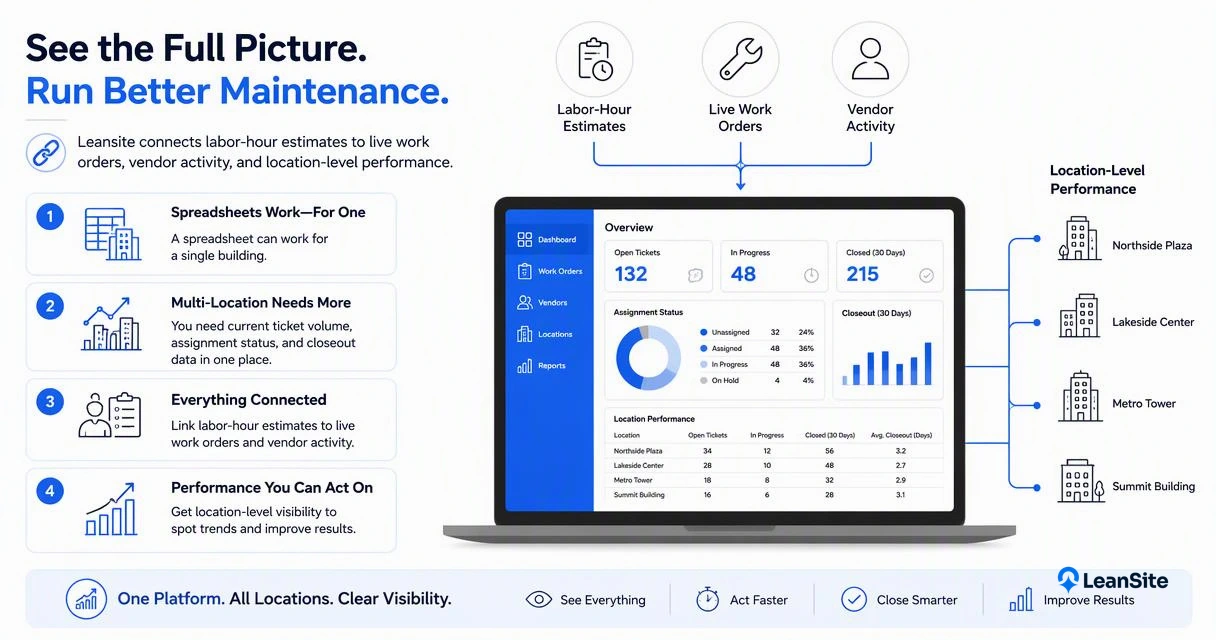
A spreadsheet can work for a single building, but multi-location operations need current ticket volume, assignment status, and closeout data in one place. The Leansite platform gives facility leaders a cleaner way to compare estimated labor with actual work completed across properties.
This is where getleansite.com fits the planning process: estimates become more valuable when they feed real dispatch, task tracking, and reporting.
Spreadsheet calculator vs. maintenance platform
| Planning need | Spreadsheet calculator | Maintenance platform |
|---|---|---|
| Estimate weekly labor | Strong for simple models | Strong with live ticket data |
| Track completion | Manual updates | Status-based work orders |
| Compare locations | Hard as sites grow | Built for portfolio visibility |
| Coordinate vendors | Usually email-based | Dispatch and closeout workflow |
| Improve future estimates | Depends on manual cleanup | Uses historical work records |
Spreadsheet math remains useful. A platform becomes more valuable when the same team must dispatch jobs, verify completion, review vendor work, and report operating costs. Buyers comparing systems can review multi-site maintenance software in 2026 for broader selection criteria.
What to expect in 2027
Maintenance labor calculators will shift from static templates to rolling forecasts based on work order history, asset condition, and vendor response patterns.
In 2027, facility teams should expect more automatic labor planning features, especially for multi-site portfolios. Forecasts will likely combine recurring schedules, seasonal demand, ticket aging, and emergency history. The practical goal stays simple: fewer surprises, cleaner staffing decisions, and better use of technician time.
FAQ about calculating maintenance labor hours
Maintenance labor questions usually come down to scope, assumptions, and how often the calculator gets refreshed.
What is the simplest formula for maintenance labor hours?
The simplest formula is labor hours = task count x average completion time. For real planning, add travel, emergency, and administrative hours. A 30-task week at 1 hour per task may still require 45 total labor hours once routing, documentation, parts checks, and urgent interruptions are included.
How often should labor-hour estimates be updated?
Maintenance labor estimates should be updated weekly for active operations and monthly for budgeting. Weekly review catches backlog growth, seasonal spikes, and emergency load. Monthly review helps owners and executives compare labor demand with asset performance, vendor spend, and staffing levels.
Should vendor time count as maintenance labor?
Vendor field hours and internal coordination time should both count, but they should be tracked separately. Vendor field hours show outsourced work volume. Internal coordination hours show dispatching, access support, quote review, invoice checks, and closeout effort that still consumes facility team capacity.
Can a calculator reduce reactive maintenance?
A calculator does not reduce reactive maintenance by itself. It shows whether enough time is reserved for preventive work, inspections, and backlog cleanup. When the estimate is tied to a ticket workflow, facility teams can protect planned maintenance hours instead of letting urgent work consume the entire schedule.
Conclusion
A calculate hours calculator for maintenance labor should be treated as an operating model, not a one-time spreadsheet. Start with task volume and average time, add travel, emergencies, vendor coordination, and admin work, then compare the estimate against actual completed work every week. For teams ready to turn labor estimates into tracked assignments and portfolio visibility, visit getleansite.com and review how Leansite supports maintenance planning.