TL;DR
Automated repair workflows reduce manual handoffs by moving repair requests through intake, triage, assignment, vendor dispatch, approvals, and reporting. The best setup keeps every job visible, uses clear rules for routing, and leaves judgment-heavy decisions with the right manager.
A repair request should not live in a text thread, a sticky note, and a vendor's inbox at the same time. Automated repair workflows give facilities teams one trackable path from issue intake to closeout, so uptime, spend, and accountability stay visible. For multi-location teams, Leansite helps turn that path into a shared operating system for tasks, vendors, approvals, and reporting.
Table of Contents
What are automated repair workflows?
Automated repair workflows are rule-based processes that move repair work from request intake through triage, assignment, vendor dispatch, status updates, approval, closeout, and reporting with less manual coordination.
Repair workflow: a repeatable sequence used to identify, assign, complete, verify, and document maintenance work.
Automation rule: a trigger-and-action instruction, such as routing HVAC emergencies to an approved vendor after business hours.
Work order: the trackable record that contains the issue, location, asset, priority, assignee, cost, photos, notes, and completion status.
Automated repair is not the same as automatic bug fixing, which refers to software systems that repair code defects without a programmer. Facilities automation still depends on human judgment for safety, budget approval, vendor selection, and work verification.
"The first rule of any technology used in a business is that automation applied to an efficient operation will magnify the efficiency. The second is that automation applied to an inefficient operation will magnify the inefficiency.", Bill Gates, The Road Ahead quote listing
That quote matters here. A messy maintenance process does not become good because software touches it. The workflow has to define who owns each step, what counts as urgent, when approvals are needed, and what data gets captured before a job closes.
How does a repair request move from intake to reporting?
A repair request moves best when every stage has a clear owner, status, rule, and audit trail.
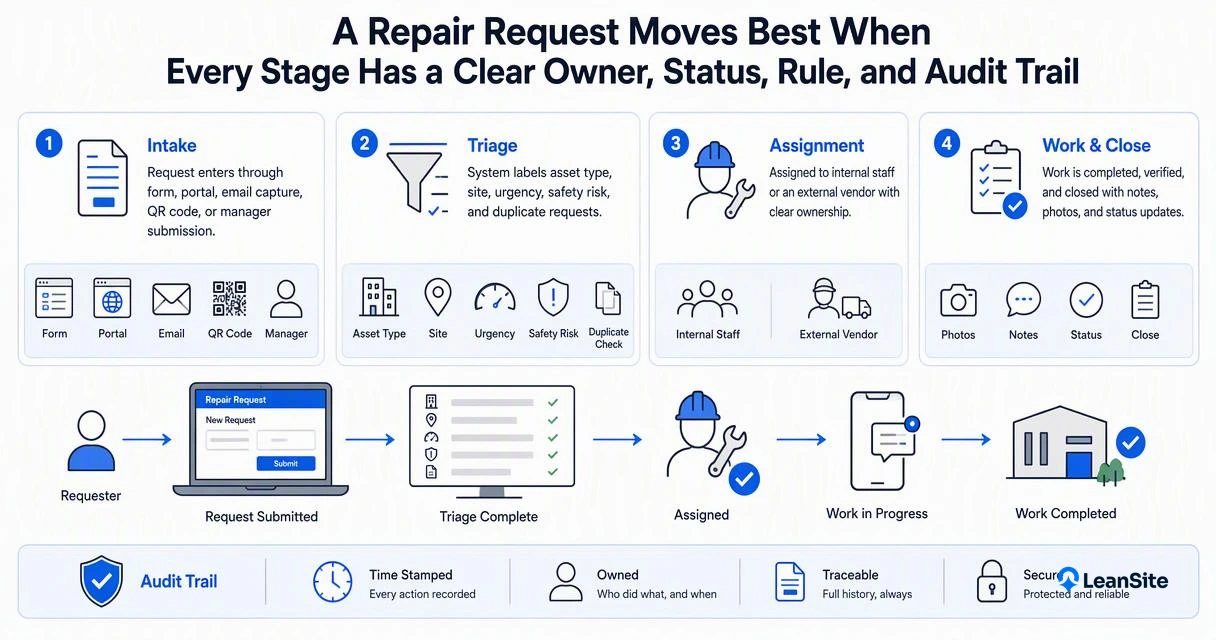
- Intake: request enters through a form, portal, email capture, QR code, or manager submission.
- Triage: the system labels asset type, site, urgency, safety risk, and duplicate requests.
- Assignment: internal staff or an approved vendor receives the job based on rules.
- Dispatch: vendor details, access notes, SLA, and scope are sent automatically.
- Status updates: timestamps, comments, photos, and ETA changes stay on the work order.
- Approval: quotes, not-to-exceed limits, and change requests route to the right approver.
- Closeout: completion evidence, invoice, asset notes, and cost codes are checked.
- Reporting: leaders review spend, response time, repeat issues, and vendor performance.
Before-and-after process map
| Stage | Manual repair process | Automated workflow process |
|---|---|---|
| Intake | Calls, texts, and emails arrive in separate places | Requests enter one queue with required fields |
| Triage | A coordinator reads every message and decides priority | Rules flag emergencies, duplicates, asset type, and site |
| Assignment | Staff manually search for the right technician or vendor | Jobs route by trade, location, availability, and approval rules |
| Dispatch | Vendor receives partial details by phone or email | Vendor gets scope, photos, access notes, SLA, and status link |
| Updates | Managers chase progress across channels | Status changes, ETAs, and notes post to the work order |
| Approval | Quotes sit in inboxes until someone notices | Cost thresholds trigger the right approval path |
| Reporting | Data is rebuilt later from invoices and notes | Cost, time, asset, and vendor data are captured as work happens |
The best version feels boring in a good way. Every job sits on the board, nothing stays trapped in someone's head, and the next action is obvious. That is the practical gap many repair tools still miss when they focus only on ticket creation.
Key takeaways for workflow design
Good repair automation starts with rules, but it succeeds because people can trust the process.
- Start with request quality: require location, asset, issue type, photos, and urgency before routing.
- Use priority definitions: emergency, urgent, routine, and deferred work should mean the same thing across every site.
- Keep approval paths simple: low-cost work can move fast, while larger quotes route to property owners or directors.
- Separate status from chatter: comments help, but official statuses should be limited and consistent.
- Track vendor evidence: completion photos, labor notes, parts, and invoices should attach to the job.
- Review repeat repairs: recurring failures often point to asset replacement, bad scopes, or weak preventive maintenance.
"If you can't describe what you are doing as a process, you don't know what you're doing.", W. Edwards Deming, The W. Edwards Deming Institute
Repair workflows also need guardrails for AI-supported triage. A 2023 review on explainable artificial intelligence notes the broader need to interpret black-box models, a useful reminder when automation starts recommending priorities or vendors in business operations Hassija et al., 2023.
Bad workflow design usually shows up as false urgency, duplicate dispatches, missing photos, stalled approvals, or invoices that do not match the approved scope. Those failures are process problems before they are technology problems.
A good rule of thumb: automate handoffs, reminders, routing, and evidence capture. Keep human review for safety risk, expensive repairs, warranty questions, and exceptions that affect tenants, customers, or brand standards.
Workflow fix video for repair teams
This CCC Intelligent Solutions video has 7,341 views in the research data and fits one core idea: small workflow fixes can save hours when repair teams stop relying on memory, callbacks, and disconnected updates.
How Leansite handles facilities repair automation
The Leansite platform is built for facilities teams that need repair work to stay visible across sites, vendors, approvals, and leadership reporting.
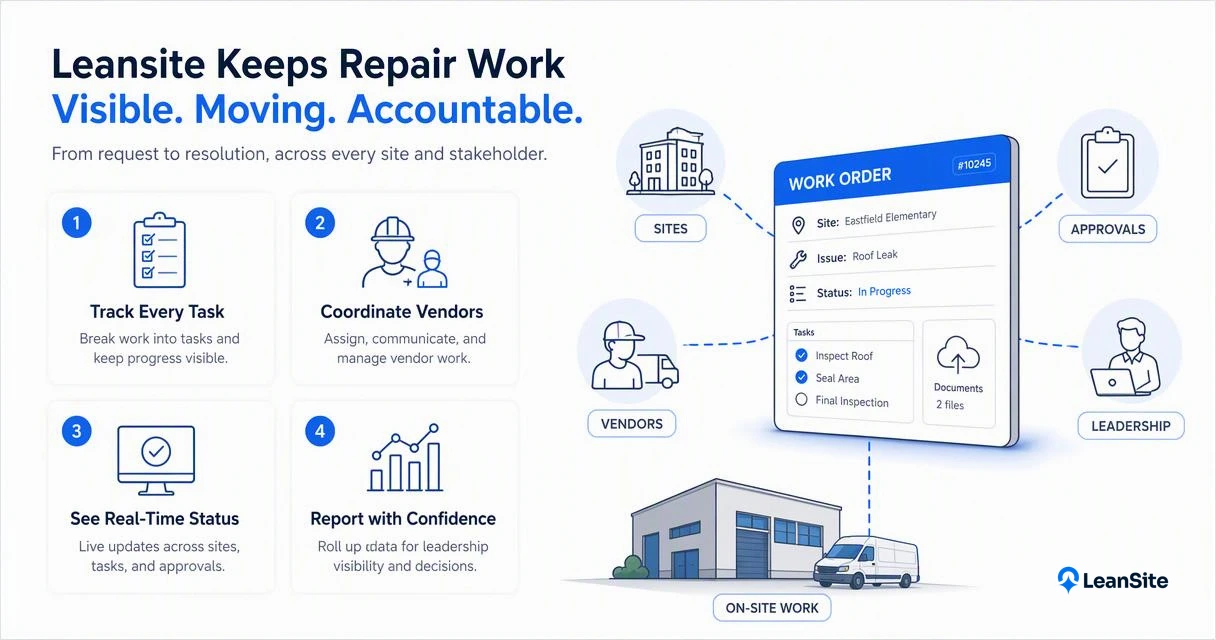
Instead of treating a work order as a static ticket, Leansite supports the operational flow around the ticket: task tracking, vendor coordination, status visibility, and cost control. That matters for property owners and enterprise operations teams because the real risk is not just an open repair. The risk is an open repair with no owner, no ETA, no cost context, and no reliable history.
Where the platform fits best:
- Multi-location repair intake across commercial properties or brand locations
- Vendor dispatch and job tracking for recurring maintenance partners
- Approval workflows for quotes, extra work, and cost thresholds
- Operating visibility for facilities directors and property owners
- Reporting on repair volume, response patterns, and asset performance
With Leansite, repair automation becomes less about replacing coordinators and more about removing low-value follow-up. The coordinator still manages judgment calls, but the platform keeps the routine motion moving.
For teams comparing spreadsheets, inboxes, and point tools, getleansite.com is the simplest next stop for seeing how repair work can move through one shared process.
FAQ: automated repair workflows in 2026 and beyond
What repair tasks should be automated first?
The best first tasks are intake routing, duplicate detection, priority tagging, vendor assignment, reminders, approval routing, and closeout evidence collection. These steps are repetitive, high-volume, and easy to define with rules. Safety decisions, scope disputes, warranty calls, and major spend approvals should still include human review.
How can teams avoid over-automating repairs?
Teams can avoid over-automation by mapping the current process before adding rules. Any step with legal, safety, budget, or customer impact should have an escalation path. Automation should speed up clear decisions, not hide uncertainty. If a rule creates confusion, the workflow needs adjustment before wider rollout.
What metrics prove a repair workflow is working?
Useful metrics include time to acknowledge, time to dispatch, time to complete, approval cycle time, repeat repair rate, vendor response time, invoice exception rate, and cost by asset or location. Reporting should connect operational activity to business outcomes, such as lower downtime and better budget visibility.
What will change for repair automation in 2027?
Repair automation in 2027 will likely lean harder on AI-assisted triage, predictive asset signals, and vendor performance scoring. The practical winner will not be full autopilot. The stronger model will combine clean workflow data, explainable recommendations, and manager-controlled approvals for expensive or risky work.
What is the best next step for facilities teams?
The best next step is to document the current repair path from request to invoice, then mark every manual handoff, approval delay, and missing data point. After that, teams can configure rules around the highest-volume repair types first. For a purpose-built facilities workflow platform, visit getleansite.com.
Conclusion
Automated repair workflows work when the process is clear before software gets involved. Facilities teams should define intake fields, priority rules, dispatch logic, approval thresholds, closeout evidence, and reporting needs before scaling automation across locations. For teams ready to replace scattered repair coordination with one visible operating flow, Leansite is a practical place to start.